Free Clock Face Template Maker- Print Your Own Blank Clock Faces

At a Glance

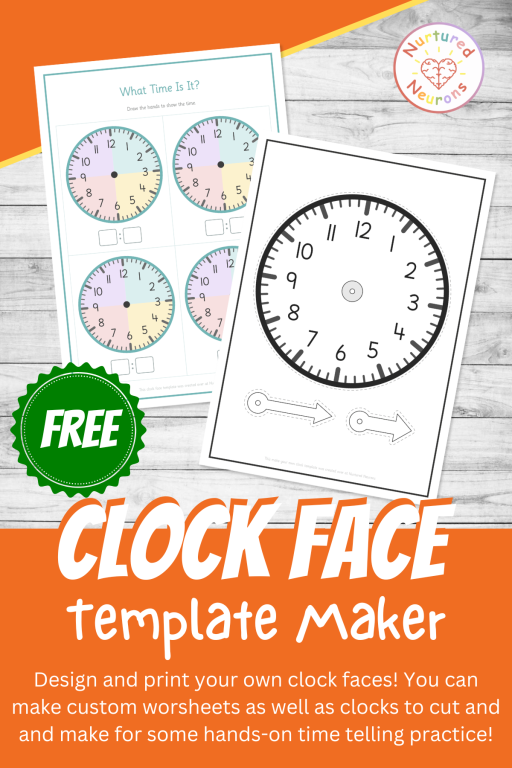
This free online Clock Face Template Maker creates printable blank clock faces and make-your-own paper clocks with cut-out hands for Pre-K through 2nd grade. Choose 1 to 12 clocks per page, add digital time boxes or writing lines, and customize numbers, ticks and past and to shading. It’s a flexible way to support hands-on telling time practice.

About the Clock Face Template Maker


Sometimes, when your helping your little ones learn how to tell the time, you just need a clock face. 

This free Clock Face Template Maker lets you create exactly that. Choose from 1 to 12 blank clock faces per page, or switch to Make Your Own Clock for a big printable clock face with chunky hour and minute hands to cut out and join with a split pin.

You can set up the clock faces just how you like them, with or without minute ticks, five-minute numbers, Roman numerals and more. There’s even some soft shading to help children see where “past” and “to” sit. Then download a ready-to-print PDF in seconds.

It’s completely free, with no account needed, so let’s get going!

Why Use these Clock Face Templates?
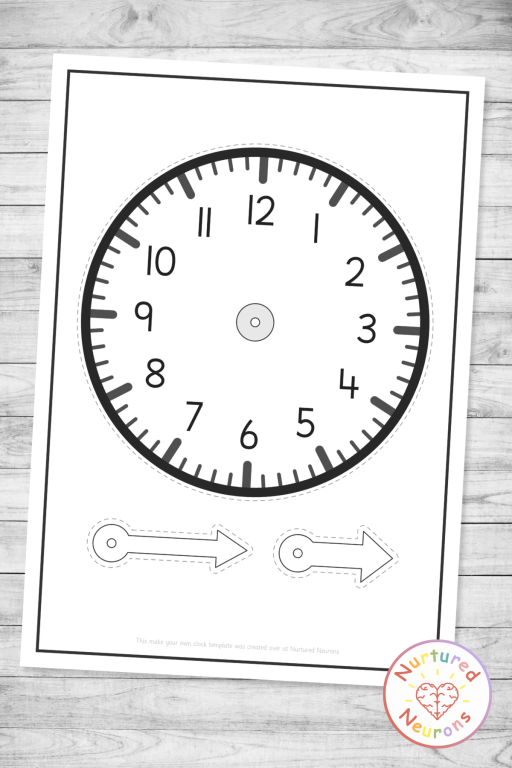
 

Make your own paper clock template with cut-out hour and minute hands and split pin hole - free printable telling time craft for kindergarten


Showing a time is different from reading one. Reading a clock asks children to recognize a time. Drawing the hands, or turning them on a paper clock, asks them to make that time. That means they have to decide which hand is which, where each one goes, and why. It helps build a deeper level of understanding.

Hands-on learning helps it click. Young children learn best when they can get stuck in! A paper clock they made themselves (and are very proud of!) lets them turn the minute hand round and watch what happens. It also opens up one of the most important ideas in time telling: the hour hand moves too. As the minute hand travels round, children can nudge the hour hand along toward the next number, just like a real clock.

It builds number sense and early fractions. The clock face is packed with math. Every number stands for another five minutes, so reading the minute hand is really counting in fives. Splitting the face into halves and quarters gives children a very concrete first look at fractions as well.

It supports the curriculum at every stage. In the Common Core State Standards, first graders learn to tell and write time in hours and half-hours using analog and digital clocks. Second graders move on to telling and writing time to the nearest five minutes. Blank clock faces and paper clocks can help to support every step of that journey.

Why This Tool Is Awesome


There’s a few reasons why I like this worksheet generator and I think you will too:

There’s a few reasons why I’m really pleased with how this one turned out:

It’s free! No membership and no sign-up. Just make your clock faces and print.

Two tools in one. Make a page of blank clock faces for drawing and writing activities, or make a whole paper clock with hands to cut out. Whatever your lesson needs, you’re covered.

The hour and minute hands look different. The hour hand is short and fat, the minute hand is longer and thinner, and they’re color-coded (red for hours and blue for minutes by default, but you can choose your own).

Past and to shading. This is one of my favorite features. Turn on face shading to color the right side of the clock (the “past” side) differently from the left side (the “to” side), or shade each quarter separately. It’s a lovely visual support for half past, quarter past and quarter to, and you can switch it off once your little learners are ready.

Clock faces for every stage. Start with the five-minute numbers for extra support. Step up to the Quarters only option (just 12, 3, 6 and 9, like lots of real clocks), choose Roman numerals, or remove the numbers completely.

Handy extras underneath. Add a writing line, digital time boxes, or both under each clock, and a blank template becomes a custom activity in seconds.

Part of the Nurtured Neurons Time family. These are the same clock faces used in my Telling Time Worksheet Maker. Children see one consistent clock across all your time activities.

Ways to Use It in Your Classroom (and at Home!)


Here’s a few ideas of how you could use your clock templates:

Show me the time. Give every child their own paper clock and call out a time. Everyone makes it on their clock and holds it up, so you can see at a glance who’s got it and who needs a little help.

Draw the hands. Choose clock faces with digital time boxes underneath and write a time in each set of boxes before you photocopy. Children draw the hands to match. Or flip it round: draw the hands yourself and children write the digital time. Or they could do it for their partner.

Our daily routine. Add a writing line under each clock and have children label them with events from their day, like “lunch,” “playtime” or “home time.” Then they draw the hands to show when each one happens. At home, this works brilliantly with a morning or bedtime routine.

A big demo clock. Print a single large clock face. It’s perfect for modeling on the board or for a small group table.

Write the numbers in. Choose No numbers with the minute ticks turned on. Children write 1 to 12 around the face themselves. It’s great number formation practice, and it really gets them thinking about where each number lives on a clock.

Make it a craft. Glue the clock face onto a paper plate or some card before adding the hands for an extra sturdy clock. Print in black and white and children can color their clock and hands however they like before assembling.

Math centers. Pop a pile of blank clock templates in a center with a set of time cards. Children pick a card and draw the hands, then a partner checks with a teaching clock or their paper clock.

Ready for more? Once your little learners are drawing and making times confidently, the Telling Time Worksheet Maker (included with Nurtured Neurons membership) creates ready-made practice sheets with matching answer sheets. There are three activity types and any mix of times you like. More time makers are on the way too, including a Draw the Hands on the Clock Worksheet Maker and a Match the Clocks Worksheet Maker.
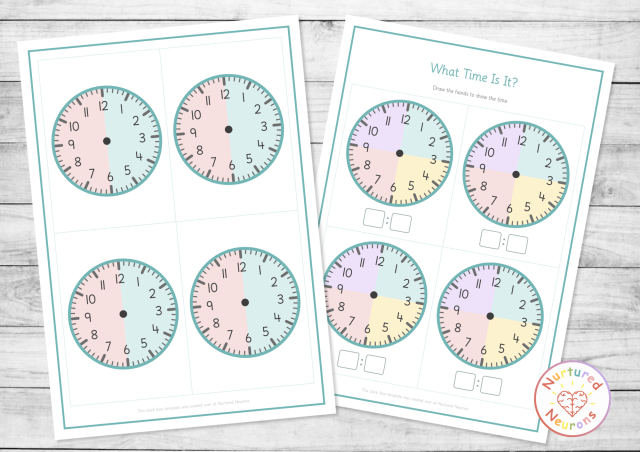
Blank clock faces with digital time boxes and past and to shading - free printable telling time template for first grade

Well, I think that about covers it. 

Follow the instructions below to generate your own clock templates!

And if you find it useful, to help get the word out could you please give it a little share or tell someone who you think would find it useful. Thanks!

How To Use

As with all the activity makers, I really want to make them as useful as possible, so there’s a few options for you to tailor it exactly as you want!

Step 1 – Choose What to Make

Start by picking what you’d like to make at the top:

  • Clock Faces – a page of blank clock faces, ready for drawing hands, writing times, making labels and more.
  • Make Your Own Clock – a big clock face plus an hour hand and a minute hand to cut out and join with a split pin.

The rest of the settings update to match your choice.

Step 2 – Choose Your Layout

Choose how many clocks you’d like on each page:

  • Clock Faces – choose 1, 2, 4, 6, 9 or 12 clocks per page. Fewer clocks means bigger faces, which is great for younger learners. 4 per page is selected by default.
  • Make Your Own Clock – choose 1 big clock on a portrait page, or 2 clocks side by side on a landscape page.

For Clock Faces, you can also choose what goes Below Each Clock:

  • Nothing – just the clock face. This is the default.
  • Writing line – perfect for labels like “lunch” or for writing the time in words.
  • Digital time boxes – two boxes for writing the digital time.
  • Digital boxes + writing line – both together.
Step 3 – Set Up Your Clock Faces

Use the toggles and dropdowns to get the clock faces just right:

  • Single-minute ticks – the small marks between the numbers. These are on by default.
  • Five-minute numbers – small numbers inside the clock showing 5, 10, 15 and so on. These are available with up to 6 clocks per page, where there’s room for them to stay clear and readable.
  • Center dot – a dot in the middle of each clock face showing where the hands start from. This is on by default. 
  • Clock Numbers – choose Standard (1-12), Quarters only (12, 3, 6, 9), Roman (I-XII), or No numbers.
  • Face Shading – adds a soft background color to each clock. Past and to halves shades the right side and the left side in two different colors, which is perfect for practicing “past” and “to.” Quarters shades each quarter of the face a different color to support quarter past, half past and quarter to.
Step 4 – Choose Your Options

Use the toggles to customize your page:

  • Title – off by default. Turn it on and a box appears where you can type your own title. 
  • Instruction line – off by default. Turn it on to add a short instruction under the title. 
  • Name line – adds a “Name:” line at the top of the page. This is off by default and only shows for Clock Faces.
  • Black and white – switches everything for ink-friendly printing. On paper clocks, the hands print white so children can color them in.
Step 5 – Pick Your Colors (Optional)
  • Accent Color – changes the page border, title and clock outlines.
  • Hour Hand and Minute Hand – these appear for Make Your Own Clock only. You can choose colors to match the teaching clock you use in class.
Step 6 – Generate and Download

Click Make My Clock Template! and click Download PDF to save your printable.

If you change any settings after generating, just click the button again to update your template.

Click Make Another to reset everything back to the defaults and start fresh.

Putting Your Paper Clock Together
  1. Cut out the clock face and both hands.
  2. Make a small hole through the pin spot in the middle of the clock and through the hole in each hand. A sharp pencil pushed through into a ball of playdough works well (this bit is a job for a grown-up).
  3. Stack the pieces with the clock face at the bottom, then the hour hand, then the minute hand on top.
  4. Push a split pin through all three from the front and open out the legs at the back. Keep it a little loose so the hands turn easily.

Printing on cardstock, or gluing the face onto a paper plate, gives you a clock that will survive lots of turning!

Hope your little learners have a great time making and using their clocks!

Hooray!

The custom clock templates should look something like this:
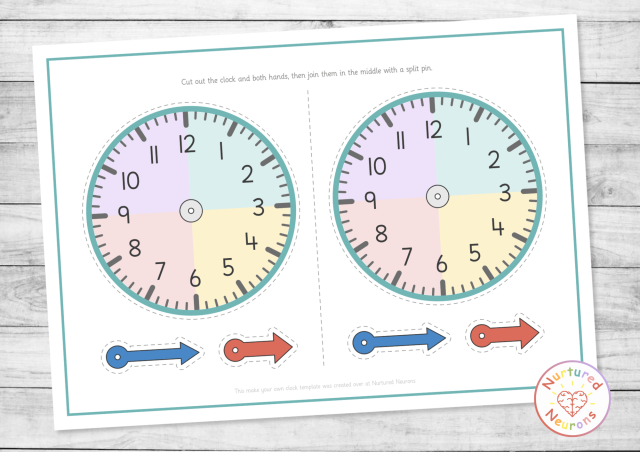
free make your own clock templates - custom clock faces to print and cut out for hands on time telling lessons

Create your Custom Clock Face Templates

Hope your little learners enjoy improving their math skills – scroll down to get started! Or check out our other worksheet and game makers here.

If you can’t see the worksheet maker – it’s probably because you’re on a mobile device. You can try switching your device to landscape mode or if that doesn’t work, try again on a PC or laptop. 

Thanks!

Clock Face Template Maker - Nurtured Neurons

⚙️ Build Your Clock Template

#74b4b4

On Your Sheet

Enjoy!

Free custom clock template maker - create your own clock face worksheets , templates and cut out and assemble clocks for hands on time telling practice

FAQ

It creates printable PDF clock templates in two styles. Clock Faces gives you a page of 1 to 12 blank analog clock faces, with an optional writing line or digital time boxes underneath. Make Your Own Clock gives you a large clock face with an hour hand and a minute hand to cut out and join with a split pin.


Yes! It’s completely free to use, with no account or membership needed.


It works really well from Pre-K through 2nd grade. Younger children love making and playing with a paper clock, while older learners can use the blank faces to draw hands for half past, quarter past and five-minute times. That said, it’s for whoever needs it, so use it wherever your little learners are!


Teachers, teaching assistants, homeschool parents, tutors and families. It’s great for whole-class teaching, math centers, small groups and intervention, crafts, homework and home practice.


Choose Make Your Own Clock, download and print your template, then cut out the clock face and both hands along the dashed lines. Make a small hole through the spot in the middle of the clock and through each hand. Stack the face, then the hour hand, then the minute hand, and join them with a split pin (a brass paper fastener). Keep it slightly loose so the hands turn easily.


Just scissors, a split pin (also called a brass fastener or paper fastener), and something to make the holes, like a sharp pencil. Printing on cardstock, or gluing the face to a paper plate or some card, makes your clock much sturdier.


That’s how most real clocks look, and it’s a really helpful clue for children. The short, fat hand shows the hour and the long, thin hand shows the minutes. The hands are also color-coded (red for hours and blue for minutes by default), so children can tell them apart by shape and by color.


Face shading adds a soft background color to each clock to show how the face splits up. Past and to halves colors the right side, where the minutes are “past” the hour, differently from the left side, where they’re counting “to” the next hour. Quarters colors each quarter of the face separately, which helps children see where quarter past, half past and quarter to sit.


It shows just the 12, 3, 6 and 9 on each clock. It’s a helpful halfway step between a full clock face and one with no numbers. Children still have landmarks to work from, but need to count on for everything in between. Lots of real clocks look like this too!


The five-minute numbers add a second ring of numbers inside the clock, so they need room to stay readable. They’re available with up to 6 clocks per page, and switch off automatically for 9 and 12 clocks per page and for Roman numerals.


Yes! The Telling Time Worksheet Maker creates custom clock worksheets with matching answer sheets, using the same clock faces as this tool. It’s included with a Nurtured Neurons membership, along with all of our other activity makers.


The Clock Face Template Maker is designed for use on a PC or laptop. If you’d like to try it on a phone or tablet, turning your device to landscape first will give you the best view.

Access all the activities today