

This interactive Skip Counting Worksheet Maker generates custom printable counting sequence sheets for Kindergarten through Grade 3. Choose any skip interval from 2 to 1000, count forwards, backwards, or mixed, set your number range, control how many numbers are hidden per row, and download a print-ready PDF with an optional answer sheet.
Looking for a fun and engaging way to teach skip counting? Our skip counting sheet maker can help!
Create customized skip count worksheets that help learners master counting by 2s, 5s, 10s, or whatever interval you choose.
These skip counting printables are great for teaching patterns, practicing times tables, improving number fluency, and building a strong math foundation.
Perfect for classrooms or homeschooling, this tool lets you generate skip counting worksheets tailored to your little learners.
Choose the range of numbers, set the number they’ll be counting on by, choose whether you want to stick purely to multiples of that number or not, and decide how many missing numbers you want in each line.
So whether it’s skip counting by 2s, 5s, or 10s, or even more challenging intervals, this tool makes it easy to create effective resources in just a few clicks.
Follow the simple instructions below to generate your own math worksheets!

Create a print-ready skip counting worksheet in just a few steps. Here’s everything you need to know:
Type a title into the Worksheet Title box. If you leave it blank, the tool will automatically generate one based on your interval and direction, for example, “Skip Counting by 5s” or “Skip Counting by 10s (Backwards).”
Pick 6, 8, or 10 rows. Fewer rows means larger, more spacious numbers on the page – better for younger learners or early practice.
Choose how much to count on by. Use the quick-select pill buttons for the most common intervals – 2s, 3s, 4s, 5s, 10s, 25s, and 100s – or type any interval from 2 to 1000 into the box directly.
Set the Start and End of the range your sequences will be drawn from. For example, a range of 0–100 with an interval of 5 will generate sequences of fives somewhere between 0 and 100.
Choose how many numbers in each row – from 0 (all numbers shown, useful for demonstration) up to 5. Each row contains 10 numbers, so the more you hide, the harder the challenge.
If you want to brighten it up a bit, use the color pickers to personalize your worksheet.
Click the colored square to open the color picker, or type a hex code directly if you have a specific color in mind.
Hit the Generate Worksheet button when you’re happy with your settings. A preview of your first few rows will appear so you can check everything looks right before downloading. Then click:
Both files download instantly as PDFs, ready to print at home or at school.
Want to Make Another? Click Make Another to go back to the settings and create a new worksheet.
Hooray!
The printed worksheets should look something like this:


Hope your little learners enjoy practicing their math skills – scroll down to get started! Or check out our other worksheet and game makers here.
If you can’t see the worksheet maker maker – it’s probably because you’re on a mobile device. You can try switching your device to landscape mode or if that doesn’t work, try again on a PC or laptop.
Thanks!
You need to be a member to use this tool - become a member today and get access to all of the teaching tools, plus a ready-to-go library of wonderful worksheets, awesome games, hands-on crafts and more!
Enjoy!
And if your little ones are in a mega mathematical mood, you might also want to check out some of the other math activities here.
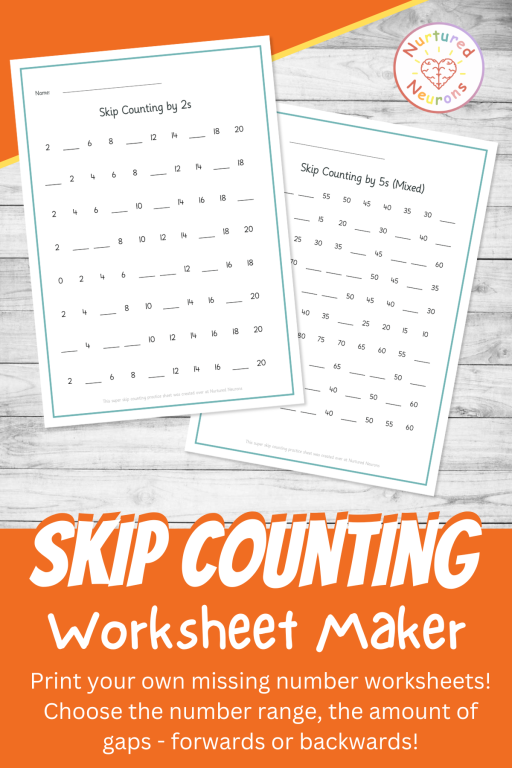


It generates printable skip counting worksheets where children fill in missing numbers in a sequence. You choose the interval, direction, number range, and how many gaps to include per row, then download a PDF ready to print – with an optional answer sheet available too.
Quick-select buttons cover the most common intervals – 2s, 3s, 4s, 5s, 10s, 25s, and 100s. You can also type any custom interval from 2 to 1000 directly into the box, so it works for unusual intervals or more advanced challenges.
It works well from Kindergarten through Grade 3, though it really suits whoever needs it – a Kindergartner just starting to count in 2s and 5s, a Grade 2 student working on 3s and 4s, or an older learner who needs more practice with any interval. The range and difficulty settings let you pitch it at exactly the right level.
It’s great for classroom teachers, teaching assistants, homeschool parents, and tutors. Use it for math centers, morning work, homework, timed practice drills, intervention sessions, or as a warm-up before a multiplication lesson. Because the interval is fully flexible, the same tool works across a wide range of year groups and ability levels.
You can choose Forwards (sequences count upward, e.g. 5, 10, 15, 20), Backwards (sequences count downward, e.g. 20, 15, 10, 5), or Mixed (each row randomly goes either forwards or backwards for a varied challenge on a single sheet).
When this is turned on, every sequence starts on an exact multiple of the interval – so counting in 5s always begins at 5, 10, 15, and so on. Turn it off to allow sequences to start at any point in the range, which is trickier as children have to figure out the pattern without the anchor of a round starting number.
Three things affect difficulty: the skip interval (larger intervals are harder), the direction (backwards and mixed are trickier than forwards), and the number of missing numbers per row (each row contains 10 numbers and you can hide up to 5 of them). You can also turn off “Start on Multiples Only” for an extra challenge.
Skip counting builds number pattern recognition, multiplication readiness (counting in 2s, 5s, and 10s directly supports times table fluency), number fluency and confidence, and an early understanding of multiples and sequences.
Yes. Enable the answer sheet option before generating and a separate answer key PDF will be available to download alongside your worksheet.
The tool is designed to work on a PC or laptop. If you’re on a mobile device, try switching to landscape mode first. If that doesn’t work, you’ll need to access it on a PC or laptop for the full experience.