

About the Ten Frame Addition Worksheet Maker
Say hello to the Ten Frame Addition Worksheet Maker – the quickest way to whip up custom, printable ten frame addition worksheets for your little learners!
For this math sheet maker, you pick the answer range, the number of problems and how your little ones will record their answers.
It’s one of the teacher tools included with your Nurtured Neurons membership, so it’s ready to use any time you need fresh ten frame addition practice in a flash.
What Are Ten Frames?

A ten frame is very useful in early math – and it’s very simple. It’s basically a rectangular grid made of two rows of five boxes – making ten boxes in total.
Children fill the boxes with dots (or counters with a hands-on version) to show a number. Three dots means three, a full top row means five, and a completely filled frame equals ten.
This neat grid layout helps children “see” a number instead of needing to count every single dot, which builds a skill called subitizing – recognizing how many at a glance, without counting one by one.
It also makes the friendly benchmark numbers of 5 and 10 clearly visible, so kids start to understand that 8 is “5 and 3 more” or “2 away from 10.”
When the answer goes above ten, we can use a double ten frame – two stacked frames giving twenty boxes in all.
and you can keep on adding ten frames in this way as the numbers get bigger!
Why Are Ten Frames Good for Your Little Learners?
Here’s why ten frames are so useful.
They build real number sense.
Instead of counting blindly, children learn to picture quantities and how they relate to 5 and 10.
This foundation really helps with mental math and place value later down the line.
They make addition something kids can actually see.
Young learners need to count real things before number symbols mean much to them.
Counting the dots in the frames to find the total is a nice step from “I can see how many” to “I can write the number sentence.”
They help children develop strategies like making ten.
Once a child can see that 9 needs just one more dot to fill its frame, a problem like 9 + 6 turns into “fill the ten first, then add what’s left.” That kind of thinking can really help with understanding how numbers can be broken down. Which leads me to:
They support composing and decomposing numbers.
Filling, comparing and combining frames helps children pull numbers apart and put them back together – which will make arithmetic easier as they develop those little mathematical brains!
Why This Tool Is Awesome
There’s a few reasons why I like this worksheet generator and I think you will too:
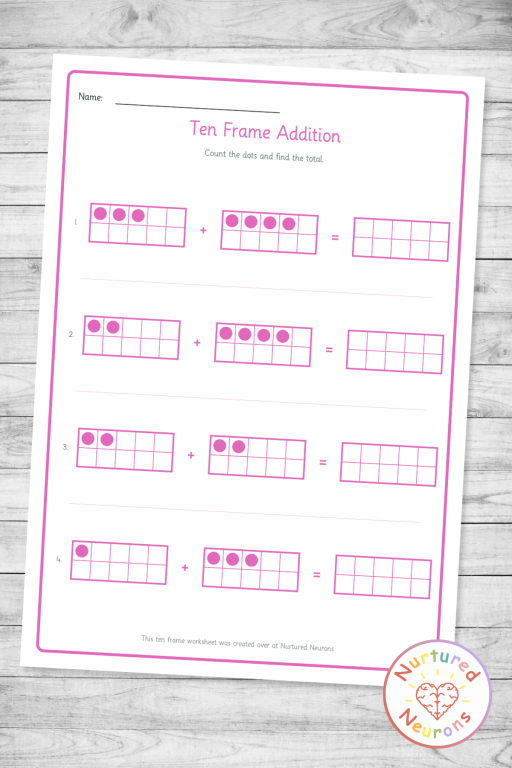
The addends are filled in for you. Each problem shows two pre-filled ten frames so your little learners can count the dots and find the total straight away.
Sums up to 20. Choose a range that goes above ten and the tool automatically gives you a double ten frame in the answer space.
You decide how your learners answer. Pick “draw in ten frame,” “write the numeral,” or both – perfect for matching the task to where each child is in their journey.
Add a write-in number sentence. Turn on the number sentence row and each problem gets write lines for both addends and the answer so your children can easily connect the picture to the equation.
Pick your range in a tap. Quick-select pills for sums to 5, 10, or 20, plus your own custom minimum and maximum if you want something specific.
A matching answer sheet. Get a clean answer key with the totals filled in, ready for fast marking or for kids to self-check.
Make it yours. Add your own title and a short instruction line, switch on black and white mode for ink-friendly printing or choose a worksheet theme color.
Ways to Use It in Your Classroom (and at Home!)
Here’s a few ideas of how you could use it:
Morning work or math warm-ups. Print a quick 4-problem sheet to get those little brains primed and counting first thing.
Math centers. Pair the worksheet with real counters or mini erasers and some larger ten frames so kids build each frame before writing.
Differentiation made easy. Hand out “sums to 5, draw your answer” for your emerging counters and “sums to 20 with a number sentence” for those ready for a bit more challenge.
Homework and home practice. Send home a friendly, visual sheet that parents can actually understand, so support at home stays consistent with the classroom.
Small group and intervention. Use the “draw in ten frame” format with a focused group to rebuild number sense alongside some manipulatives.

Well, I think that about covers it.
Follow the instructions below to generate your own tens frame addition practice sheets!
And if you find it useful, to help get the word out could you please give it a little share or tell someone who you think would find it useful. Thanks!
The 10-frame addition practice sheets should look something like this:
Enjoy!


