Dice Dojo: Subitize & Solve - The Free Subitizing & Arithmetic Dice Game

At a Glance

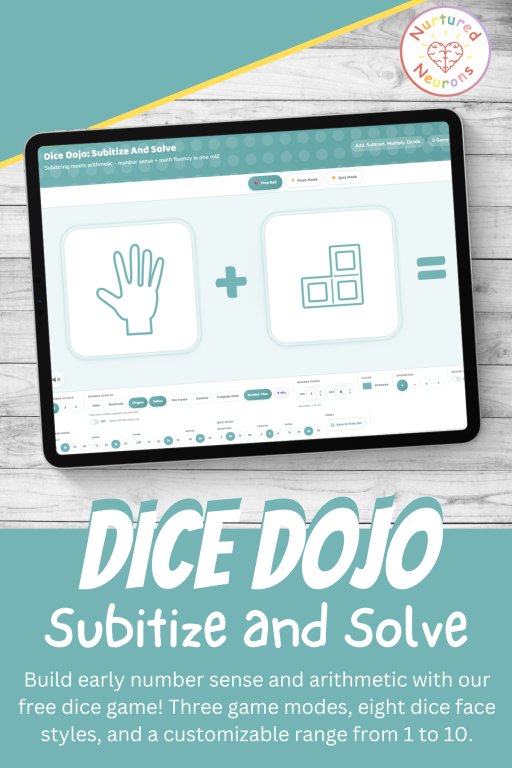
This free online math dice game, Dice Dojo: Subitize & Solve, builds early arithmetic skills on top of solid number sense. Roll 2, 3, or 4 virtual dice, choose your operator (+, -, x, or ÷), switch between eight subitizing face styles, and adjust the number range to suit any learner from Kindergarten to Grade 4. Three game modes take your little ones from teacher-led exploration all the way to independent practice.

About Dice Dojo: Subitize & Solve


Welcome to Dice Dojo: Subitize & Solve  – the second game in the Dice Dojo series, and one I’m really excited about!

It’s been designed with a classroom whiteboard in mind but will also work beautifully on a laptop or a tablet in landscape mode, which makes it just as handy for whole-class warm-ups as for some practice at home.

If you’ve already tried Dice Dojo: Subitize & Say, this one will feel immediately familiar – but this time there are up to four dice on screen at once and operations – and the whole thing builds toward your little ones not just recognizing quantities but doing something with them!

And because we love learning through some real-world play, members can also print their very own matching dice nets. So whatever face style you’ve been playing with on screen – dots, dominoes, ten frames etc. – your little ones can fold up a paper dice that match and bring the learning from the screen into their classroom or home!

What Is Subitizing?
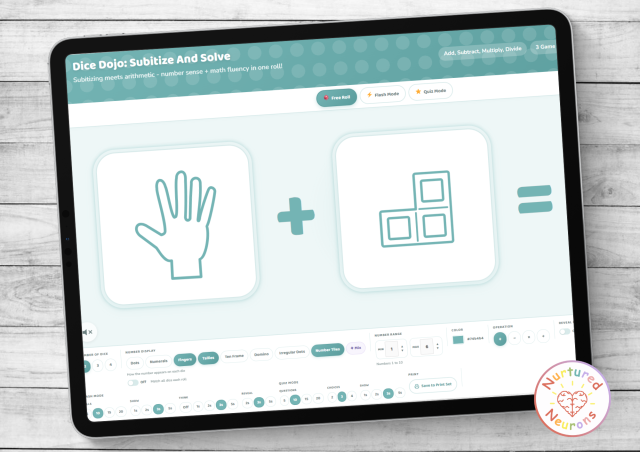
Free online subitizing and adding math dice game! Three modes, seven dice face styles, a customizable range, and printable paper dice for taking the game offline.

If “subitizing” sounds a bit fancy, don’t worry – it’s a really a simple idea with a fancy name.

Subitizing is the ability to look at a small group of objects and just know how many there are, without counting them one by one. The word comes from the Latin subitus, meaning “sudden.” When you glance at a die showing four dots and instantly think “four” – that’s subitizing in action.

There are actually two flavors of subitizing:

  • Perceptual subitizing is the instant, no-thinking-required recognition of small quantities (usually up to 4 or 5). You see three dots and you know it’s three, no counting involved.
  • Conceptual subitizing is what you do with bigger amounts. You see six dots arranged as two groups of three, and instead of counting “1, 2, 3, 4, 5, 6,” you think “three and three – that’s six.” You’re chunking quantities into smaller groups you already recognize.

Both types matter, and Dice Dojo: Subitize & Solve gives your little learners practice with both. The dot face arrangements (and irregular dot face, ten frame, domino, fingers, number tiles and tallies) all encourage children to see numbers as patterns.

(Quick side note: you can pronounce it “soob-itize” or “sub-itize” – both are acceptable, so go with whichever feels right!)

Why Is Subitizing Important for Your Little Learners?

Subitizing is one of the most important early math skills your little learners can develop.

Very young children are sensitive to numbers and naturally compare small and large groups of objects from their first years of life, and the ability to recognize quantities without counting has a lasting influence on math development right through to elementary school and beyond.

Researchers at Stanford’s DREME Network describe subitizing as the very first way children experience quantities – starting from birth – and a foundation that many other math skills build on, including counting itself.

In other words: subitizing (in some form, even if the number words aren’t known yet) comes before counting, and supports counting.

Children who can subitize small quantities have a much stronger foundation when it’s time to count larger amounts, group numbers together, add, subtract and eventually multiply.

Here’s why it matters so much:

It builds true number sense. Mathematics educator John Van de Walle highlighted the role of subitizing in helping children understand number as a quantity rather than just a memorized symbol or sequence. When children can see that “five” means a particular amount of stuff (not just a squiggle on a page), everything that they need to learn after makes more sense.

It speeds up arithmetic. Researchers have linked early subitizing fluency to faster, more confident performance with operations like multiplication later on.

Imagine doing 4 + 3 in your head: if you can subitize four and three instantly, you’re already halfway there. If you have to count out four fingers and then three more fingers and then count them all together, you’ve used a lot of mental energy before you’ve even started the addition.

If you’d like to dig into more activities for early number sense alongside this tool, our number sense worksheets and number bond printables are great companions.

Why This Tool Is Awesome

There are plenty of subitizing worksheets and games floating around the internet, but most of them are fixed – you get what you get. This tool is a bit different, and here’s why we love it:

The three modes work together

The three game modes aren’t just three different ways to play the same game. Together they map onto the Gradual Release of Responsibility model – sometimes shorthanded as “I do, we do, you do.”

It’s a well-established framework in teaching, and the basic idea is simple: teachers first model a skill, then practice it together with the children, and finally let the children practice it on their own – so support gradually decreases as their confidence grows.

Here’s how the three modes line up:

  • Free Roll (I do) – You’re in control. Roll, discuss, hide the dice, reveal the answer. Use Focus mode to step through the equation one die at a time and build a running total on screen. Brilliant for modeling some math strategies with your class.
  • Flash Mode (We do) – The sequence runs automatically. Dice show, then disappear, giving thinking time before the equation reveals itself die by die. Great for whole-class chanting practice.
  • Quiz Mode (You do) – Children see the dice flash, then answer tiles appear and they pick the right number. Score and streak track their progress. A real chance to apply what they’ve learned independently.

Use them in that order across a week and you’ve got a beautifully structured progression from teaching to fluency to independent practice. Or mix and match however suits your class.

Eight face styles

This is genuinely one of our favorite features. Rather than just plain dot dice (lovely though they are), Dice Dojo: Subitize & Solve lets you switch between seven different ways of representing each number (or mix and match as you like):

  • Dots – the classic dice arrangement
  • Irregular Dots – dots that are not in the normal dice patterns, perfect for stretching some of that conceptual subitizing we mentioned earlier
  • Fingers – hands showing the quantity
  • Tallies – tally marks
  • Ten Frame – the wonderful 2×5 grid that’s so important for early number sense (you can see why we love these in our pumpkin ten frame printables too!)
  • Domino – a single domino half showing the value (if you like dominoes, we have this awesome domino maker tool as well!)
  • Number Tiles – a visual representation of the number

And in this tool as it can get tricky fast, there’s numerals included as an option as well if they just wanted a bit of old fashioned arithmetic practice.

Adjustable operators and dice count

Choose from +, -, x, and ÷, and set 2, 3, or 4 dice per roll. That combination gives an enormous range of difficulty. Two dice adding single digits to 3? Perfect for early Kindergarten. Four dice multiplying values up to 10? Well, that’s a lot harder!

Math rules

Two optional rules help keep things from getting too tricky too quickly:

  • No Negatives – ensures subtraction results never dip below zero
  • Whole Numbers – ensures division results are always whole numbers, so you never land on a decimal…

Focus mode for step-by-step equation building

Inside Free Roll mode, the Reveal one at a time toggle switches on Focus mode. Instead of all dice revealing at once, they uncover left to right – with a running total shown as each die is added in.

Print your own real dice (member feature)

This is one of my favorite things about this tool though! The bridge between screen and table. Digital and real world. Members (you lucky so and sos!) can save the dice they’ve been playing with on screen and download a printable PDF of dice nets to use for real! The faces match exactly what they’ve been seeing on screen, so if you’ve been playing with ten frame dice, you can print ten frame dice. If you’ve been mixing styles, you can print a set of mixed-style dice.

Print them, fold them, glue them, and your little learners have their very own physical version of the game to take to math centers, take home, or just keep in a math basket along with some manipulatives, ready to go.

Ways to Use It in Your Classroom (and at Home!)

Here are some ideas to get you rolling (yep). Mix, match, and adapt to suit your little learners.

Morning math warm-up – Pop it on the whiteboard for the first few minutes of math time. Free Roll mode, choose the representation and range that suits your learners. Roll it, kids shout the number, ask “how did you see it?” before clicking reveal. Easy way to get brains warmed up.

The full I-do-we-do-you-do progression – Start the week in Free Roll for instruction. Move to Flash Mode for repeated practice mid-week. Finish in Quiz Mode to see how they’re getting on.

Differentiation made easy – Set two dice, a low range and addition for your learners who need it. Or set four dice, multiplication or division, full range for children who are ready for a challenge!

Math center activity – Set the tool up on a tablet in landscape mode in a math center. In Quiz Mode, children can play independently with no adult support. The score and streak tracker keep them motivated.

Times table warm-up – Set the face to numerals, the operator to multiplication, choose 2 dice and pick a specific range (say 2-5 for practicing the 2, 3, 4, and 5 times tables) – and run a flash sequence.

Whole-class flash games – Project Flash Mode on the whiteboard, set rolls to 15, show time to 2 seconds, and let your class shout the answer together. I wanted this mode to almost be like a interactive video that you could tailor to your little ones.

Bridging screen to hands-on – Members can play on screen, then print matching dice nets and take the game offline. Use the printed dice for partner games, math center activities, board game style addition or subtraction games, or some take-home math practice.

Homeschool math practice – Five minutes a day in Flash or Quiz Mode, one operator per week, gradually expanding the range. Simple and consistent.
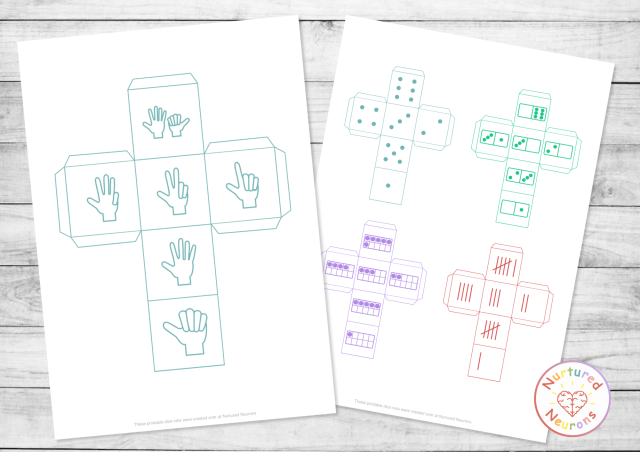
Printable Subitizing Dice - create and print custom dice for number sense practice

Well, I think that about covers it. 

Follow the instructions below to get subitizing and solving!

And if you find it useful, to help get the word out could you please give it a little share or tell someone else who you think would find it useful. Thanks!

How To Use

As with the other activity makers, I really want to make them as useful as possible, so there’s a few options for you to tailor it exactly as you want!

Step 1 – Pick a Game Mode

At the top of the tool you’ll see three big mode butttons: Free Roll, Flash, and Quiz. Tap whichever one suits the moment. Free Roll is the default and the most teacher-led; Flash runs an automated sequence; Quiz turns it into a multiple-choice game.

Step 2 – Choose How Many Dice

In the tray at the bottom, use the Dice controls to choose 2, 3, or 4 dice per roll.

Step 3 – Pick an Operator

Tap one of the four operator buttons in the tray: +, –, x, or ÷.

Step 4 – Choose Your Dice Face Style

In the tray at the bottom, you’ll find pills for the different representations:

  • Dots – classic dice pips
  • Irregular Dots – scattered, non-standard arrangements
  • Fingers – hands
  • Tallies – tally marks
  • Ten Frame – 2×5 grid
  • Domino – single domino half
  • Number Tiles – interlocking counting squares
  • Mix – mixes all seven subitizing styles
  • Or there’s just plain old numerals!

You can also tap Match all dice each roll when Mix is on to force all dice to use the same representation each time (rather than mixing styles across the dice).

Step 5 – Set Your Number Range

Use the minimum and maximum controls to choose what numbers your dice can roll. Anywhere from 1 to 10, and the min must be lower than the max. If you’d like only the numbers 1 to 5 to come up, set min to 1 and max to 5. Want to focus on bigger numbers? Try 5 to 10.

Step 6 – Set Your Math Rules (Optional)

Two optional rules:

  • No Negatives – prevents subtraction from going below zero
  • Whole Numbers – ensures division always produces a whole number result

Step 7 – Pick a Color (Optional)

Tap the color picker to choose the color of the dice dots and numerals. Match your classroom theme or just pick your favorite!

Step 8 – Play!

Now hit the big Roll! button at the bottom right. What happens next depends on your mode:

  • In Free Roll – The dice tumble and land. Tap Hide to cover the faces, Show Faces to bring them back and Reveal Answer to flip to the numerals and show the equation. Ready for the next one? Hit Roll Again. To step through dice one at a time, toggle on Reveal one at a time – this activates Focus mode, where you use Next to reveal each die individually and can see a running total as you go.
  • In Flash Mode – Set how many rolls in the sequence (5/10/15/20), how long the dice show (1-5 seconds), thinking time (1-5 seconds), and reveal time (2-5 seconds). Hit Start Flash and the sequence runs automatically, revealing dice left to right before showing the full equation. Tap the screen to skip any timer.
  • In Quiz Mode – Set how many questions (5/10/15/20), how many answer choices (2/3/4), and how long the dice show before the tiles appear. Hit Start Quiz, watch the dice, then tap the correct answer tile. Wrong answer? Try again, or tap Show Again to see the dice once more. Score and streak track your progress.

Step 9 – Save to Print Set (Optional, Members Only)

After any roll, tap Save to Print Set to save the current dice to your printable set. You can save up to six dice. Then head down to the Dice Net Generator below the tool, choose your size (Large, Medium, or Small), and download a PDF of printable dice nets matching exactly what you’ve been playing with on screen. Print, fold, glue, and you’ve got real-world dice to match – love it!

Step 10 – Fullscreen (Optional but Best!)

The best way to play – tap the fullscreen button to take the tool into fullscreen mode. Press Escape or tap the button again to exit.

Hope your little learners have a blast subitizing and solving!

Hooray!

Play the Subitize and Solve Dice Game

Hope your little learners enjoy improving their math skills – scroll down to get started! Or check out our other worksheet and game makers here.

If you can’t see the game – it’s probably because you’re on a mobile device. You can try switching your device to landscape mode or if that doesn’t work, try again on a PC or laptop. 

Thanks!

Nurtured Neurons | Dice Dojo: Subitize and Solve
What do you think the answer is?
=
What do you think the answer is?
What's the answer?
Try again!
🔥 Streak: 0 Score: 0
Done!
🎯
Hmm, those settings won't work
Please widen the number range or relax a math rule, then try again.
Sequence in progress...
Saved (0/6):
Number of Dice
Number Display
How the number appears on each die
Number Range
MIN
MAX
Numbers 1 to 10
Color
#74b4b4
Operation
No Negatives
On
Whole Numbers
On
Reveal one at a time
Off
Flash Mode
Rolls
Show
Think
Reveal
Quiz Mode
Questions
Choices
Show
Print
Action

If you're a member, you can download the dice you just rolled on screen to use in the real world! Log in or sign up today!

Want to record what they've just rolled?

The Roll, Draw and Solve Worksheet Maker was built as the perfect companion to this game!

Choose the same operation and dice count you’ve been practicing with, print a sheet and your little learners can roll their dice, draw the pattern they see into the blank squares and write and solve the number sentence below.

Enjoy!

Dice Dojo Subitize & Solve - free online subitizing and arithmetic math dice game for kids. play on whiteboard in class or on a tablet with printable paper dice nets

FAQ

It’s a free online math dice game that combines subitizing (recognizing quantities instantly) with early arithmetic. Roll 2, 3, or 4 virtual dice, choose your operator (+, -, x, or ÷), and your little learners read the values from the dice faces and solve the equation. Three game modes let you use it for teacher-led instruction, timed whole-class practice, or independent quiz-style play. Members can also print real matching dice nets.

It’s designed to stretch from around Kindergarten all the way through Grade 4 — but whoever needs it will benefit. At the simpler end, two dice adding values to 6 is perfect for early Kindergarten. At the harder end, four dice with multiplication or division across a range of 1-10 is a genuine Grade 3-4 challenge. The customizable range, dice count, and operator mean you can meet children wherever they are.

It’s built for teachers, teaching assistants, homeschool parents, and tutors working with children on early arithmetic and number sense. Use it for whole-class warm-ups on a whiteboard, math center practice on a tablet, 1-on-1 intervention, or homework support. It works equally well in school and at home.

Yes – the game is completely free to play, no account needed and nothing to download. Just open the page and roll! The matching printable dice nets are a member feature, available with a Nurtured Neurons membership.

Free Roll is teacher-controlled — you roll, hide, and reveal at your own pace with lots of room for “how did you see it?” discussion. Flash Mode runs an automatic timed sequence ideal for whole-class practice. Quiz Mode turns it into a multiple-choice game where children tap the correct answer — great for independent practice at a math center. Together they map nicely onto the “I do, we do, you do” gradual release teaching model.

Focus mode is a toggle inside Free Roll called Reveal one at a time. Switch it on and instead of all dice revealing together, each die uncovers from left to right with a running total shown as you go. It’s a brilliant way to model equation building step by step — perfect for children who are still developing their mental math strategies and need to see the numbers building before the final answer appears.

The No Negatives rule ensures subtraction never goes below zero — essential for learners who haven’t encountered negative numbers yet. The Whole Numbers rule ensures division always produces a whole number result, which keeps things clean for children who haven’t met fractions. You can toggle either or both on depending on your learners’ stage.

Dots (classic pips), irregular dots (non-standard scattered arrangements), fingers (hands), tallies (tally marks), ten frames (2×5 grids), dominos (a single domino half), number tiles (interlocking counting squares), and Mix (which cycles through all eight). You can pick one style, use the Mix setting, or check the “Match all dice each roll” option in Mix mode to keep all dice showing the same representation on each roll.

Because it builds flexible number sense. A child who can subitize “four” from a ten frame, “three” from a finger arrangement, and then add them — is doing genuinely different (and better) thinking than a child who reads “4 + 3” as abstract symbols. The subitizing step means the quantities feel real before the computation begins, which supports deeper understanding and more confident arithmetic.

It’s designed primarily for laptops, PCs, and interactive whiteboards. It works well on tablets in landscape mode, which makes it great for math centers and home tablet practice. On a mobile phone the layout will be too cramped — a tablet or larger screen gives the best experience.

Yes, particularly in Quiz Mode. The child watches the dice, picks the correct answer from the tiles, gets immediate feedback, and their score and streak are tracked automatically. No adult needs to be present. Flash Mode also works well solo for children who are independently practicing their arithmetic facts.

Yes, with a Nurtured Neurons membership! After rolling on screen, you can save your dice to a print set (up to six dice), then download a printable PDF of matching dice nets. So if you’ve been playing with ten frame dice and the multiplication operator, you can print those exact ten frame dice and use them for hands-on partner games or math center activities. It’s our favorite way to bridge screen play and real-world practice.

They share the same platform — same dice engine, same face styles, same audio, same print set system. They even share the same dice net generator, so a saved set can include dice from either game. Subitize & Say focuses on recognizing quantities; Subitize & Solve adds the arithmetic on top. Together they make a natural progression.

Yes! We have phonics dice, story dice, and gross motor dice variants in the works. Every Dice Dojo tool will feel familiar from the first roll.

Access all the activities today