

Customize and Generate Math Sheets With Our Subtraction Worksheet Maker
At a Glance
This free online Subtraction Worksheet Maker generates custom printable subtraction practice sheets for Kindergarten through Grade 4. Choose horizontal or vertical format, set your number range from within 10 up to within 1000, control whether regrouping is required, pick your problem count and download a print-ready PDF with an optional answer sheet.
Looking for an easy way to help your learners master subtraction? Then this subtraction worksheet maker could be just what you’re looking for!
This tool makes it simple to generate math worksheets tailored to your needs. Whether you’re teaching basic taking away skills to young learners or reinforcing subtraction practice, this tool has you covered.
With customizable options, you can create worksheets that match the right difficulty level for your students, set the layout and print an answer sheet if you want.
In just a few clicks, you’ll generate math worksheets that are ready to print and use. It’s perfect for classrooms, homeschooling, or just some extra subtraction practice at home.
Follow the simple instructions below to generate your own math worksheets!

How To Use
Create a print-ready subtraction worksheet in just a few steps. Here’s everything you need to know.
Step 1 – Give Your Worksheet a Title
Type a title into the Worksheet Title box. If you leave the title box blank, the tool will automatically use “Subtraction Practice.”
Step 2 – Choose Your Problem Format
Pick how you’d like the questions to appear on the page:
- Horizontal – questions are written across the page in the familiar format, like this: 14 – 6 = ___
- Vertical – questions are stacked in columns in the traditional column subtraction style, with the numbers written one above the other and a line underneath to write the answer.
Step 3 – Choose How Many Problems
Pick 10, 16, 20, 24, or 30 problems. The font size and spacing adjust automatically so everything fits neatly on one page – fewer problems means larger, more spacious text, which is great for younger learners or early practice.
Step 4 – Set the Number Range
Use the quick-select buttons to choose a preset range, or set your own using the Min and Max fields.
- Within 10 – single-digit subtraction, great for beginners
- Within 20 – a natural step up once the basics are solid
- Within 100 – two-digit numbers with a mix of difficulty
- Within 1000 – larger numbers for more advanced practice
Want something in between? Just type your own values – for example, Min: 1 and Max: 15 will generate problems using numbers from 1 to 15, including a natural mix of single and double-digit numbers.
The Min and Max values refer to the largest number (the minuend) in each problem. The number being subtracted is always chosen by the tool so the answer stays positive.
Step 5 – Options
- Regrouping (borrowing) — when this is turned on, problems may include questions where borrowing across place values is needed (for example, 32 – 17). Turn it off to generate problems where no borrowing is required – useful when your little learners are still building confidence with column subtraction.
- Name line – adds a name line at the top of the worksheet so students can write their name before they start.
- Answer sheet – enables a separate answer sheet download alongside your worksheet.
Step 6 – Colors
Use the color pickers to personalize your worksheet.
- Border – changes the color of the decorative border around the page.
- Title – changes the color of the worksheet title text.
Click the colored square to open the color picker, or type a hex code directly if you have a specific color in mind.
Step 7 – Generate and Download
Hit the Generate Worksheet button when you’re happy with your settings. A preview of your first few questions will appear so you can check everything looks right before printing. Then click:
- Download Worksheet to save your printable PDF.
- Download Answer Sheet (if you turned on the answer sheet option) to save the matching answer key.
Both files download instantly as PDFs, ready to print at home or at school.
Want to Make Another? Click Make Another to go back to the settings and create a new worksheet. Your previous settings are cleared so you can start fresh.
Hooray!
The printed worksheets should look something like this: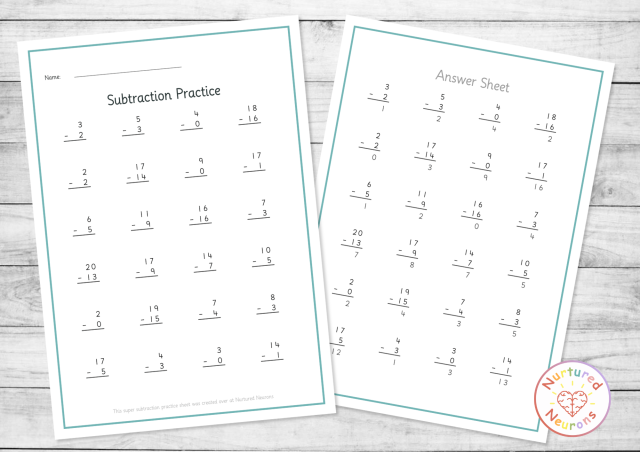
Hope your little learners enjoy practicing their math skills – scroll down to get started! Or check out our other worksheet and game makers here.
And if you want access to hundreds of readymade worksheets and awesome activities and hands-on crafts, become a member today and get INSTANT access to the ENTIRE printable library!
Or if you were just after a few custom worksheets, but found this tool useful, please consider giving us a little share… Thanks!
Create a Subtraction Worksheet
If you can’t see the worksheet maker maker – it’s probably because you’re on a mobile device. You can try switching your device to landscape mode or if that doesn’t work, try again on a PC or laptop.
Thanks!
Subtraction Worksheet Maker
Generate printable subtraction practice sheets in seconds
Horizontal & Vertical Regrouping Control Custom Number Range Answer Sheet
⚙️ Worksheet Settings
Max must be greater than Min.
The larger number in each problem will fall within this range.
#74b4b4
#2d3a3a
Preview (first 8 problems)
FAQ
It generates printable subtraction practice worksheets based on the number range and format you choose. Set your options, hit Generate, and download a PDF ready to print – with an optional answer sheet available alongside it. It’s free to use and produces a fresh set of problems every time.
It works well from Kindergarten upward, starting with simple within-10 problems, right through to Grade 4 and beyond for anyone working on larger numbers or regrouping. The number range and regrouping settings mean you can pitch it at exactly the right level for your learner – no matter where they are in their subtraction journey.
It’s great for classroom teachers, teaching assistants, homeschool parents, and tutors. Use it for morning work, math centers, homework, timed drills, or intervention sessions. The range and regrouping options make it easy to quickly differentiate across ability levels – you can have beginners working within 10 and more confident learners tackling within 1000, all from the same tool.
There are four preset ranges – Within 10 (single-digit subtraction, great for beginners), Within 20 (a natural step up once the basics are solid), Within 100 (two-digit numbers with a mix of difficulty), and Within 1000 (larger numbers for more advanced practice). You can also type your own minimum and maximum values for something in between, like 1 to 15.
The Min and Max values set the range for the largest number (the minuend) in each problem. The number being subtracted is always chosen by the tool so that the answer stays positive – no negative numbers will appear on the worksheet.
Regrouping (also called borrowing) is what happens in column subtraction when you need to borrow from the next place value – for example, 32 – 17 requires regrouping because 7 is bigger than 2. When the regrouping toggle is on, the tool may include problems like this. Turn it off to generate problems where no borrowing is needed, which is useful when learners are still building confidence with column subtraction.
Horizontal format displays problems left to right in the familiar format (14 – 6 = ___), which is great for quick mental math practice. Vertical format stacks numbers in the traditional column subtraction style with a line underneath for the answer, which is better suited to larger numbers and when showing working is important.
You can choose from 10, 16, 20, 24, or 30 problems per worksheet. The font size and spacing adjust automatically – fewer problems means larger, more spacious text, which is great for younger or less confident learners.
Yes. Enable the answer sheet option before generating and a separate answer key PDF will be available to download alongside your worksheet.
The tool is designed to work on a PC or laptop. If you’re on a mobile device, try switching to landscape mode first. If that doesn’t work, you’ll need to access it on a PC or laptop for the full experience.
Enjoy!
And if your little ones are in a mega mathematical mood, you might also want to check out some of the other math activities here.

Want More?


