Create Spelling Practice Pages with this Trace, Copy, Cover & Write Worksheet Maker

At a Glance

This interactive Spelling Practice Worksheet Maker generates custom Trace, Copy, Cover and Write spelling sheets for children aged 5–10. Enter any word list - up to 50 words - choose your colors, and download a print-ready PDF in seconds. A built-in fold line lets children self-check from memory, making it perfect for weekly spelling practice, vocabulary work, or differentiated groups.

About the Spelling Practice Worksheet Maker


This Spelling Practice Worksheet Maker lets you generate a beautiful, print-ready spelling worksheet in seconds – just paste in your word list, hit generate, and download your PDF. 

Each worksheet uses the Trace, Copy, Cover and Write method – a multisensory approach that gives your little learners four different ways to interact with each spelling word on a single sheet.

Type in any words you like, from classroom spelling lists, high-frequency words, topic vocabulary etc. and the tool handles the rest. Got more than ten words? No problem – the PDF automatically adds as many pages as you need.

What Is the Trace, Copy, Cover and Write Method?
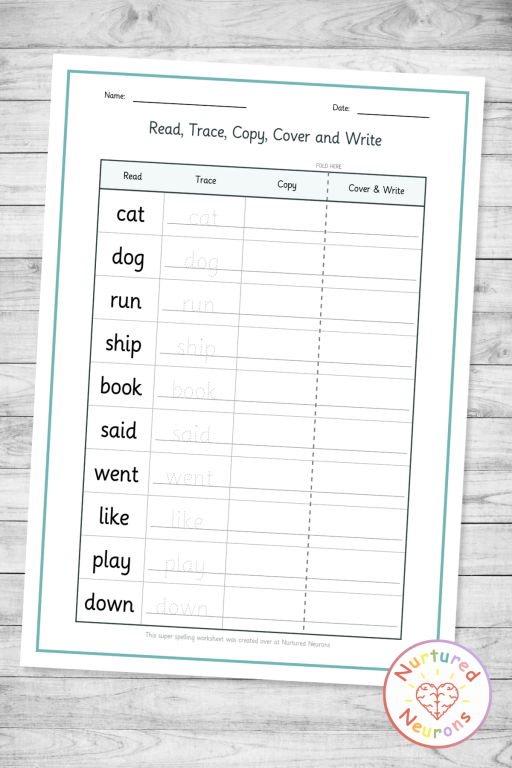
custom spelling practice worksheet maker - create your own spelling test templates with look, trace, copy and write method - printable pdf

The Read, Trace, Copy, Cover and Write method is a structured spelling practice technique that guides children through a word multiple times using different strategies – each one building on the last.

Here’s how each step works:

Read – The word is printed clearly in the first column. Children read it, say it aloud and look carefully at every letter before they do anything else. This gets that brain ready for the next steps.

Trace – The word appears again in a dotted outline font, ready for children to trace over the letters. This builds the hand-muscle memory for forming the word while reinforcing letter order.

Copy – Children write the word again from scratch in the next column, this time with no tracing guide – just the word in the Read column to refer back to. This step bridges guided practice and independent recall.

Cover and Write – The last column sits behind a fold line. Children fold the sheet along the dashed line so the Read, Trace, and Copy columns are hidden away bwa ha ha! – then write the word entirely from memory.

The fold-and-hide design is one of the things that makes this method so effective. Children can check their own work by simply unfolding the sheet – ta-daa!

Why This Tool Is Awesome


Here’s a few reasons I think you’ll enjoy using this early spelling worksheet maker:

You bring the words, the tool does everything else. Paste in your spelling list – up to 50 words – and the worksheet is generated instantly.

Auto-pagination means no awkward cutoffs. The tool fits 10 words per page and automatically creates as many pages as your word list needs. Whether you’ve got 8 words or 45, the PDF always looks good!

The fold line is built right in. A dashed “Fold Here” line is printed on every page, right before the Cover and Write column. Children can find it immediately, fold it themselves so self checking is easy.

Two handy toggles for extra control. Turn on Force Lowercase to automatically clean up a copied word list (no more accidentally printing “Was” with a capital W). Toggle the Name and Date lines on or off depending on whether you need them.

Ways to Use It in Your Classroom (and at Home!)


Weekly spelling homework. Generate a worksheet at the start of each week using that week’s spelling list and send it home. Parents don’t need to do anything except encourage their child to fold and check – the worksheet explains itself.

Morning work or early finisher activity. Spelling worksheets are ideal for settling children in at the start of the day.

Differentiated spelling groups. Because the tool accepts any word list, you can create separate worksheets for different ability groups in minutes.

Intervention and catch-up. For children working on specific phonics patterns or tricky high-frequency words, this is a low-prep way to give extra targeted practice.

Curriculum vocabulary. It’s not just for spelling lists! Science keywords, topic words, even names of characters or places in a class novel – the trace-copy-cover structure works for any vocabulary you want to use.

At-home practice between sessions. For tutors or parents supporting spelling at home, this tool makes it easy to create a professional-looking practice sheet in under a minute. Just type in the words from the child’s school list and go.

Independent spelling centres. Print a stack at the beginning of a unit and put them in a reading or writing centre. Children can work through them at their own pace with zero adult input required.


create custom spelling exercises - with these printable trace and write worksheets - differentiated

Oh and I hope you notice the lovely font. That’s our own Early Readers font, that has been specially designed to keep the letters clear and simple!

Well, I think that about covers it. 

Follow the instructions below to generate your own spelling word practice sheets!

And if you find it useful, to help get the word out could you please give it a little share or tell someone who you think would find it useful. Thanks!

How To Use

I wanted to make the best trace, copy, cover and write practice generator I could, so there’s a few options for you to tailor it exactly as you want!

Step 1 – Add a Title (Optional)

The title field at the top comes pre-filled with “Read, Trace, Copy, Cover and Write.” You can leave it as-is, change it to something like “Week 3 Spellings” or your child’s name, or anything else that makes sense for your worksheet. It’ll appear centred at the top of every page.

Step 2 – Paste Your Spelling Words

Click into the big text box and type or paste your spelling words – one word per line. You can add up to 50 words total. The live counter at the bottom right shows you how many you’ve entered. The PDF will automatically create as many pages as your list needs, with 10 words per page – so don’t worry about that!

Step 3 – Choose Your Colors (Optional)

Two colour pickers sit below the word input:

  • Border Color – controls the page border around each sheet.
  • Title Color – controls the colour of your title text at the top.

Click either swatch to open your colour picker and choose anything you like. 

Step 4 – Set Your Options (Optional)

Two toggles sit below the colour pickers:

  • Force Lowercase – on by default; automatically converts all your words to lowercase before generating. 
  • Show Name and Date – on by default; adds Name and Date lines at the top of each worksheet page. Turn it off if you don’t need them.

Step 5 – Generate and Download

Hit the big Generate Worksheet button. The tool will validate your word list and show a preview of your words below. Then click Download Worksheet to save your PDF. That’s it!

Click Make Another to reset the tool and start fresh with a new word list. Your previous settings (colours, toggles) reset to their defaults.

Hope your little learners fly through their spellings this week!

Hooray!

The printed spelling practice sheets should look something like this:

A printable Read, Trace, Copy, Cover and Write spelling worksheet showing 10 words - because, believe, brother, caught, different, friend, library, minute, should, together - laid out in a four-column table with a dashed fold line before the Cover and Write column. Name and date lines appear at the top.

Create your Look, Copy, Cover and Write Practice Sheets

Hope your little learners enjoy improving their spelling – scroll down to get started! Or check out our other worksheet and game makers here.

If you can’t see the sight word practice worksheet maker – it’s probably because you’re on a mobile device. You can try switching your device to landscape mode or if that doesn’t work, try again on a PC or laptop. 

Thanks!

You need to be a member to use this awesome tool - become a member today and get access to all of the teaching tools, plus a ready-to-go library of wonderful worksheets, awesome games, hands-on crafts and more!

Enjoy!

spelling practice sheet worksheet creator - printable custom pdf - copy and write

FAQ

It’s a spelling practice technique where children read a word, trace over it, copy it, and then write it from memory after folding the page to hide their previous answers. The fold-and-self-check design means children can assess their own work without any adult help.

It’s similar! Look, Cover, Write, Check is a well-known spelling strategy. This method adds two extra steps – Trace and Copy – between looking and covering, giving children more scaffolded practice before the memory recall step. The tracing step in particular is great for younger or less confident writers.


It works well across a wide range, roughly ages 5-10. The method itself is simple enough for early learners but effective enough to use with older students working on trickier vocabulary. The difficulty is determined entirely by the words you enter, so it’s naturally differentiated.

Absolutely. The tool auto-sizes the font for each word, so longer words are simply printed a little smaller to make sure they fit neatly in the columns. It works well for everything from three-letter words to longer curriculum vocabulary.

Up to 50 words per PDF. The tool automatically paginates – 10 words per page – so a list of 30 words generates a clean three-page PDF.

Yes, and the Force Lowercase toggle (on by default) will automatically convert them all to lowercase for you. If you want to keep capitals – for proper nouns, for example – just turn the toggle off before generating.


The dashed “Fold Here” line is printed between the Copy and Cover and Write columns on every page. Children just need to fold the sheet along this line before writing the last column so that the Read, Trace, and Copy columns are hidden. After they’ve written the word from memory, they can unfold to check their own answer. It’s a built-in self-correction mechanism – no marking required!

Of course! Any words you want children to practise writing and remembering work great here – topic vocabulary, science keywords, high-frequency words from a specific phonics phase, even names or places from a class text.

No, they’re often taught together. Most guidance supports teaching kids to read primarily with phonics, while also giving some focused help for tricky or high-frequency words. Teaching both can really help with fluency.

Access all the activities today